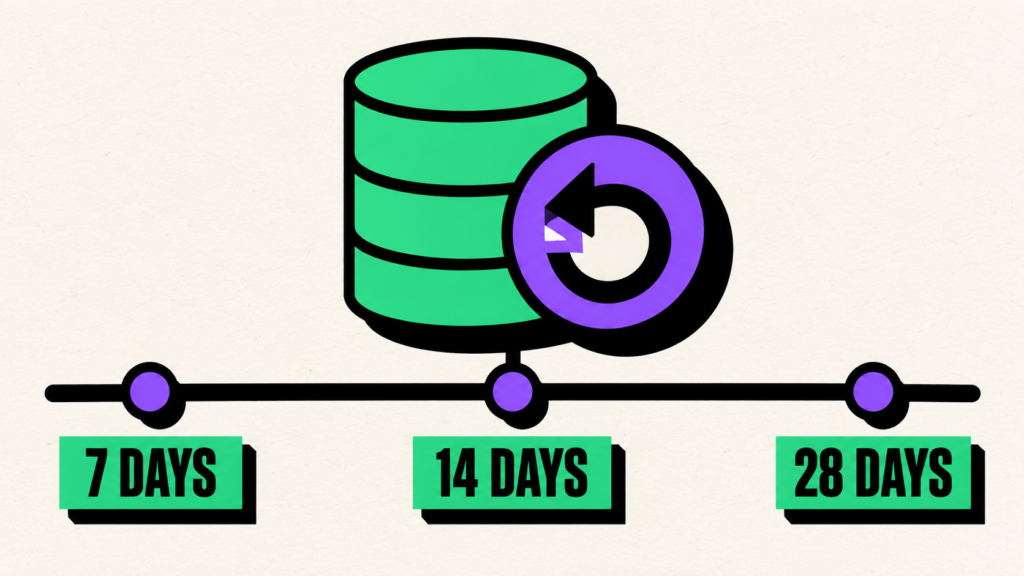
Supabase Point-in-Time Recovery costs approximately $100 per month for 7 days, $200 for 14 days, or $400 for 28 days of retention, per project. However, that add-on price is not the complete bill. PITR is available only on paid plans, requires at least a Small compute instance, and is billed separately for every project where it is enabled.
For one project on the Pro plan, the practical minimum monthly total is approximately:
| PITR retention | PITR add-on | Estimated minimum project total* |
|---|---|---|
| 7 days | ~$100/month | ~$130/month |
| 14 days | ~$200/month | ~$230/month |
| 28 days | ~$400/month | ~$430/month |
*The estimate assumes a $25 Pro subscription, a $15 Small compute instance, and the plan’s $10 monthly compute credit. It excludes taxes, disk overages, additional projects, and other usage.
Is PITR worth it? For a production application that cannot afford to lose a full day of transactions, a 7-day window is often the most reasonable starting point. Fourteen days makes sense when incidents may remain hidden for more than a week. Twenty-eight days is mainly justified by long incident-detection cycles, strict recovery requirements, or a business cost of data loss that comfortably exceeds the extra $300 per project each month.
This guide breaks down the actual Supabase PITR pricing, explains what each retention window protects you from, and helps you decide whether PITR, scheduled backups, or both are appropriate for your application.
Supabase PITR pricing at a glance
As of September 2026, Supabase publishes the following Point-in-Time Recovery rates:
| Recovery window | Hourly PITR price | Approximate monthly PITR price | Best suited to |
|---|---|---|---|
| 7 days | $0.137/hour | $100 | Most production SaaS applications and transactional systems |
| 14 days | $0.274/hour | $200 | Teams with slower incident discovery or longer review cycles |
| 28 days | $0.55/hour | $400 | High-value systems with long detection windows or formal retention needs |
Supabase bills PITR by the hour. If it is active for part of an hour, that hour is billed in full. Disabling it stops new PITR charges from the time it is removed, but the hours already used remain billable.
The rates come from Supabase’s current Point-in-Time Recovery usage documentation. Because cloud pricing changes, verify the official page before approving a long-term budget.
What is Point-in-Time Recovery?
Point-in-Time Recovery lets you restore a PostgreSQL database to a selected moment within a defined recovery window. Instead of choosing only from one backup per day, you can choose a time with up-to-seconds granularity.
Supabase PITR combines physical backups with archived PostgreSQL Write-Ahead Log files. PostgreSQL records database changes in the WAL before applying them to data files. During a restore, Supabase loads a suitable physical backup and replays the WAL records up to the selected timestamp.
This is valuable when the latest database state is the problem. Consider these incidents:
- A deployment runs a destructive migration at 3:17 PM.
- An administrator deletes customer records at 10:42 AM.
- A broken background job corrupts invoice totals over several hours.
- An attacker changes data before access is revoked.
- An application bug starts writing incorrect values without immediately crashing.
With daily snapshots, the closest clean restore may be many hours old. With PITR, you can target a point shortly before the damaging transaction.
According to Supabase’s database backup guide, enabling PITR replaces the normal Daily Backup process because PITR provides finer recovery granularity.
The real monthly cost of Supabase PITR
The $100, $200, and $400 figures describe the PITR add-on itself. Your full Supabase cost includes the base plan and required compute.
PITR requires a paid plan
PITR is available as an add-on for Pro, Team, and Enterprise projects. It is not available on the Free plan. The Pro plan currently starts at $25 per month for an organization.
PITR requires at least Small compute
Supabase requires projects using PITR to run at least a Small compute add-on. Small compute is currently listed at $15 per month. Paid plans include $10 in monthly compute credits, so a single Small project effectively adds about $5 beyond the Pro subscription when that credit is available.
That produces the following baseline for one Pro organization with one PITR-enabled project:
- 7-day PITR: $25 Pro + $15 Small compute + $100 PITR − $10 compute credit = approximately $130/month
- 14-day PITR: $25 + $15 + $200 − $10 = approximately $230/month
- 28-day PITR: $25 + $15 + $400 − $10 = approximately $430/month
The official billing example also shows a total of $130 for one Pro project using Small compute and 7-day PITR.
The add-on is charged per project
PITR is not an organization-wide feature that automatically covers every database. Supabase charges for each project where the add-on is active.
For example, three projects with 7-day PITR would create roughly $300 per month in PITR add-on charges before their plan, compute, disk, and usage costs. This is why production, staging, preview, and development projects should not all receive PITR by default.
The Spend Cap does not cover PITR
Supabase explicitly states that PITR is not protected by the Pro plan’s Spend Cap. It is a deliberately enabled project add-on and continues to be billed while active.
This does not make the charge unpredictable—the hourly price and active projects are visible—but it does mean that enabling the Spend Cap will not stop PITR fees. Review unused projects regularly and disable PITR where it no longer serves a recovery requirement.
Is 7-day Supabase PITR worth it?
Seven-day PITR is the most practical tier for many production applications. It protects against recent operational mistakes while keeping the add-on at its lowest price.
It is usually worth considering when your database stores:
- Customer accounts and paid subscriptions
- Orders, invoices, or payment-related records
- User-generated content
- Business workflow history
- Inventory, bookings, or availability
- Data that changes continuously and cannot be recreated reliably
The main question is not, “Could something go wrong?” It is, “Would we detect the problem within seven days?”
For obvious incidents, the answer is often yes. A failed deployment, accidental table deletion, or widespread application error usually triggers alerts or customer reports quickly. A seven-day window gives the team time to investigate, choose a safe timestamp, and plan the restore.
Seven days may be insufficient when corruption is subtle. If a background job changes a small percentage of records each night and nobody reviews those records for two weeks, every point inside a seven-day recovery window may already contain the bad data.
Best fit for 7 days
Choose seven days when:
- Production issues are monitored and reviewed quickly.
- Your team has alerts, logs, and an incident-response process.
- Most destructive mistakes would be detected within hours or days.
- The application needs a recovery point much better than 24 hours.
- The additional $100 per project is proportionate to the business risk.
For a small SaaS product with paying customers, this is generally the tier to evaluate first.
Is 14-day Supabase PITR worth it?
Fourteen-day PITR doubles the add-on cost to about $200 per project each month. Its main benefit is not finer recovery precision; both tiers offer up-to-seconds selection. The benefit is a longer period in which a clean recovery point remains available.
The 14-day tier becomes useful when your business may take more than one week to discover incorrect data. Examples include:
- Financial or operational data reviewed every two weeks
- B2B workflows where clients report discrepancies late
- Low-traffic features that are not exercised every day
- Data pipelines whose outputs receive delayed human review
- Teams without weekend or continuous operational coverage
- Integrations that silently overwrite valid records
Imagine a faulty synchronization job that starts on the first day of the month. The problem is found during a review on day ten. A 7-day window cannot take the database back to a clean point before the corruption began; a 14-day window potentially can.
Best fit for 14 days
Choose 14 days when:
- Important data is validated weekly or fortnightly rather than daily.
- Some failures can remain silent for longer than seven days.
- The database is central to B2B or back-office workflows with delayed feedback.
- Losing the additional recovery history would cost more than another $100 per month.
Do not select 14 days only because it sounds safer. First examine how long incidents actually take to detect. If nearly every meaningful problem is identified within 24 hours, the second week may add little operational value.
Is 28-day Supabase PITR worth it?
At approximately $400 per project each month, 28-day PITR is a significant infrastructure decision. It costs four times the 7-day tier while providing the same point selection granularity. You are paying for a much longer historical recovery window.
Twenty-eight days may be justified for:
- High-value databases where silent corruption could remain hidden for weeks
- Monthly reconciliation, audit, or reporting cycles
- Enterprise systems with formal recovery requirements
- Applications with complex integrations and slow validation loops
- Organizations where a single unrecoverable incident could create losses far above $400
Suppose an accounting integration incorrectly changes a field that is checked only during month-end reconciliation. A seven- or fourteen-day window may have expired before the error is discovered. Twenty-eight days gives the team a better chance of reaching a point before the first bad write.
However, PITR restores the database as a whole. If valid transactions continued for weeks after the corruption began, rolling the entire project back may discard a large amount of correct recent work. A longer PITR window does not remove the need for selective data repair, audit logs, or off-site exports.
Best fit for 28 days
Choose 28 days when:
- Your detection window genuinely approaches a month.
- Monthly business processes can reveal previously hidden corruption.
- Recovery requirements or internal policies specify a longer window.
- The data-loss impact comfortably exceeds the additional cost.
- You have a tested plan for reconciling valid changes made after the chosen restore point.
For early-stage applications with fast issue detection, 28 days is often difficult to justify. Improving monitoring and maintaining independent backups may deliver more resilience per dollar.
7 vs 14 vs 28 days: a practical decision table
| Decision factor | 7 days | 14 days | 28 days |
|---|---|---|---|
| PITR add-on cost per project | ~$100/month | ~$200/month | ~$400/month |
| Restore precision | Up to seconds | Up to seconds | Up to seconds |
| Detection window covered | Recent incidents | Delayed weekly incidents | Long or monthly-cycle incidents |
| Typical team | Monitored production SaaS | B2B or slower review workflows | Enterprise or high-value operations |
| Main advantage | Lowest-cost PITR protection | Extra time to discover silent corruption | Longest self-service recovery history |
| Main drawback | Clean point may expire quickly | Double the 7-day cost | Four times the 7-day cost |
The best retention tier is the shortest window that is longer than your realistic incident-detection time, with enough margin for investigation and restore planning.
PITR vs daily backups: what are you paying for?
PITR and daily backups solve different recovery problems.
| Capability | Daily backup | Supabase PITR |
|---|---|---|
| Recovery-point frequency | One scheduled recovery point per day | Selected time with up-to-seconds granularity |
| Maximum potential recent data loss | Up to roughly one day | Usually much smaller, depending on the latest available recovery point |
| Included with paid plan | Yes | No; paid add-on |
| Minimum compute requirement | No PITR-specific requirement | At least Small compute |
| Best for | General snapshots and lower-risk workloads | Transactional production systems |
Daily backups may be enough for a content site, development environment, internal tool, or application where yesterday’s state is acceptable. PITR becomes valuable when hours of lost data would be expensive or impossible to reconstruct.
Supabase notes that the latest displayed PITR point can lag behind the current time when the database has had no recent activity. In that case, no transactions occurred during the apparent gap, so the latest recovery state can still represent the current database state.
PITR is not a complete backup strategy
PITR is excellent for operational recovery inside Supabase, but it should not be mistaken for an independent copy of the entire project.
Supabase Storage objects are not included
Supabase database backups contain Storage metadata but not the actual files stored through the Storage API. Restoring the database does not restore a file that was deleted from a bucket. Storage objects require their own backup process.
Project deletion removes associated backups
Supabase states that deleting a project permanently removes its associated data and backups. An off-platform backup protects against a different failure boundary because the recovery copy remains outside the original project.
Restores require downtime
During a Supabase restore, the project is inaccessible. The duration depends partly on database size. Teams should plan how the application will behave during recovery and communicate expected downtime.
PITR does not replace restore testing
A recovery feature is useful only when the team understands how to operate it. Document the restore decision process, define who may authorize it, and practice recovery in a safe environment where possible.
PITR vs automated off-site backups
PITR offers recovery precision. Scheduled logical backups offer portability and independence. One is not a perfect replacement for the other.
| Requirement | PITR | Encrypted off-site logical backup |
|---|---|---|
| Restore to a precise recent time | Strong | Limited by backup schedule |
| Copy outside the Supabase project | No | Yes |
| Portable PostgreSQL export | No direct downloadable PITR archive | Yes |
| Protect actual Storage bucket files | No | Only if the backup process separately supports them |
| Typical recovery point | Seconds-level selection | Daily or weekly snapshot |
| Primary purpose | Fast operational rollback | Independent recovery copy and portability |
For a customer-facing production application, a layered strategy can make sense:
- Use 7-day PITR for recent mistakes and low data-loss tolerance.
- Keep encrypted daily or weekly logical backups outside Supabase.
- Back up Storage objects separately if the application depends on them.
- Retain selected long-term backups according to business and compliance needs.
- Test that the logical export can actually be restored.
SupaBackup automates encrypted Supabase database backups to the customer’s own Google Drive. It does not provide seconds-level point-in-time recovery, but it gives you an off-site logical copy on a daily or weekly schedule. For many production systems, that complements PITR more effectively than simply purchasing a longer PITR window.
If you use pg_dump for off-site copies, remember that the export transfers data out of Supabase. Our guide to Supabase pg_dump and egress explains how that traffic affects the unified egress allowance.
How to choose the right Supabase PITR retention
Use a risk-based decision instead of defaulting to the longest affordable tier.
1. Estimate your required recovery point objective
Your recovery point objective is the maximum amount of recent data the business can afford to lose. If losing 12 hours of orders is unacceptable, daily backups alone do not satisfy that requirement. PITR may.
2. Measure incident-detection time
Review previous application and data incidents. How long passed between the first bad write and detection? Use the slowest credible detection path, not only obvious outages.
3. Add investigation time
Detection is not the same as knowing the correct restore timestamp. Your team may need hours or days to verify when corruption began. The clean recovery point must remain available throughout that investigation.
4. Calculate the full per-project cost
Include the paid plan, required Small compute, PITR tier, additional projects, taxes, and any disk or usage charges. Do not multiply only the $25 Pro price.
5. Compare the cost with the loss scenario
Estimate the financial and operational impact of unrecoverable data: refunds, manual reconstruction, customer support, churn, downtime, and reputational harm. PITR is worth buying when the expected protection is more valuable than the recurring cost.
6. Protect the failures PITR does not cover
Add independent logical backups, Storage-object protection, configuration documentation, and restore testing. Buying 28 days of PITR does not compensate for missing file backups or an untested recovery process.
Common PITR pricing mistakes
Assuming PITR costs only $100 total
The 7-day add-on starts around $100 per project, but Pro and Small compute requirements bring a one-project baseline closer to $130 before other usage.
Enabling PITR on staging and preview projects
Because pricing applies to every enabled project, non-production environments can multiply the bill. Most test databases can use scheduled snapshots or reproducible seed data instead.
Treating 28 days as four times safer
The 28-day tier provides four times the history of the 7-day tier, not four times the restore precision. If incidents are detected within two days, the extra three weeks may rarely help.
Expecting PITR to restore uploaded files
PITR protects PostgreSQL data. Supabase Storage objects live outside the database backup and need separate protection.
Relying on the Spend Cap
PITR is not covered by the Spend Cap. It continues to generate hourly add-on charges until disabled.
Key takeaways
- Supabase PITR costs approximately $100, $200, or $400 per month per project for 7-, 14-, or 28-day retention.
- One Pro project with the required Small compute starts at roughly $130, $230, or $430 per month after the standard compute credit.
- Every tier offers up-to-seconds restore selection; the higher price buys a longer historical window.
- Seven days is the logical starting point for many monitored production applications.
- Fourteen or twenty-eight days becomes valuable when silent corruption may not be detected for weeks.
- PITR is billed hourly, charged per project, and not covered by the Spend Cap.
- It does not back up Supabase Storage objects or provide an independent off-platform copy.
- PITR plus encrypted off-site backups usually provides broader protection than either approach alone.
So, which PITR tier should you choose?
For most monitored production applications, start by evaluating 7-day PITR. Move to 14 days only when important corruption can realistically remain undetected for more than a week. Choose 28 days when monthly review cycles, contractual requirements, or the business value of the database clearly justifies the $400-per-project add-on.
Whichever tier you select, keep an independent recovery copy. PITR handles precise operational rollback; encrypted logical backups provide portability and separation from the original project. If you want scheduled Supabase backups delivered directly to a Google Drive account you control, start with SupaBackup.